Salesforce is a flexible and powerful cloud platform with support for a broad range of business functions including managing products and pricing. Up to 2024 Salesforce product pricing capabilities had evolved through the separate platform capabilities of Sales Cloud, Salesforce CPQ, Salesforce B2B Commerce Cloud, and Salesforce Industries. Towards the end of 2024 Salesforce launched Revenue Cloud Advance or as it now simply called, Revenue Cloud with a view to provide a single, scaleable and flexible platform for managing the business of quote to cash within an organisation and extending outside an organisation to enable business partners and customers access to capabilities such as product catalogs and quoting facilities. As such the scope of Revenue Cloud is extensive but at its core sits a pricing engine which has evolved from the earlier products highlighted above and attempts to present a unified set of flexible capabilities to manage pricing for an organisation across a wide range of scenarios. We describe here this pricing engine within Revenue Cloud and the pricing capabilities it offers.
The diagram below shows the fundamental building blocks of Revenue Cloud pricing.

The first thing to highlight is that the foundations of Revenue Cloud are built on the Sales Cloud standard objects:
- Product
- Price Book
- Price Book Entry
- Opportunity
- Quote
- Quote Line Item
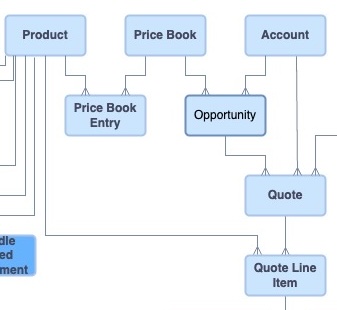
One significant item to note from this is the continuing dependency on Price Book selection when quoting. A Quote is generated from Products which are referenced from a specific referenced Price Book. So Price Book setup and selection are fundamentals to be considered in designing any pricing solution.
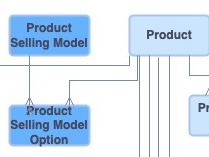
The Price Book Entry continue to provide the starting price or list price associated with a Product. However another significant item to note is the addition of the Product Selling Model object which allows Products to be priced with different models eg One time charge, monthly price, yearly price. This model concept extends to the Price Book Entry such that a single Product can now have multiple price book entries based on separate Product Selling Models.
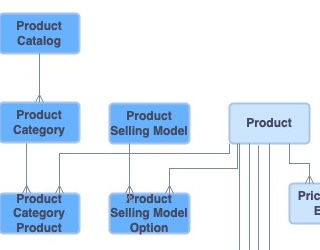
Adding to the Product Selling Model, we now have in Revenue Cloud a Product Catalog whereby products are assigned Categories which are associated with Product Catalogs. Catalogs and Categories aid product discovery when building quotes and a product can be associated with multiple Categories and Catalogs.
It is important to plan your Product setup in terms of Price Books and Catalogs. Typical considerations are how do you segment your products in terms of pricing and product selection.
Products, Price Books, and Catalogs therefore form the basis of setting up a quote and beginning the pricing process. This process within Revenue Cloud has a system construct at its core called a Pricing Procedure.
The origins of the Pricing Procedure lie within the Salesforce Industries platform briefly described in my earlier article. Salesforce Industries provides a decision making capability based on data tables, called Lookup Tables, which contain input and output data definitions combined with logic rules. These Lookup Tables are combined with a construct called an Expression Set which uses customisable Elements which contain all the associated additional linked logic and Lookup Table definitions to model a business process. Two types of Lookup Tables are defined – Decision Matrix and Decision Table. The point to note regarding Decision Tables is they reference their data from one or more Salesforce Objects, and the Decision Table must be maintained for updates to records in these Salesforce Objects through a refresh mechanism.
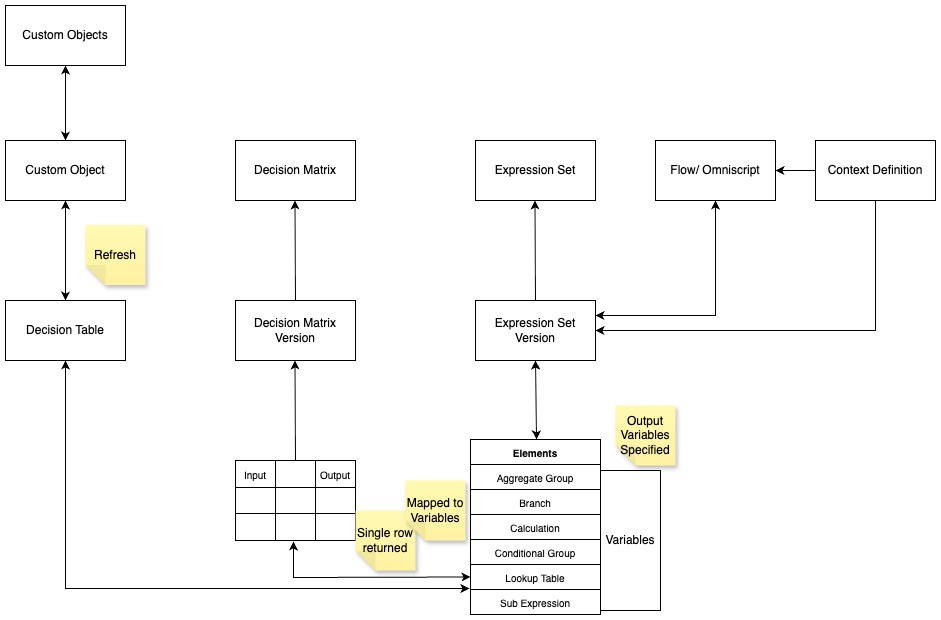
Revenue Cloud Pricing Procedures are extensions of Expression Sets with a set of ready to go Elements and associated Decision Tables to provide the out of the box standard pricing mechanisms supported by Revenue Cloud. These Elements are described below.
Price Elements provided with the standard Pricing Procedure within Revenue Cloud are
- List Price
References the Price Book Entries Decision Table which uses the Price Book Entry standard object. Inputs are Product, selected PriceBook and Product Selling Model. Output is List Price. From this we can see that the fundamental building block of getting a list price from a price book entry has now been encapsulated within the Pricing Procedure.
- Volume Discount
Provides a price based on quantity discounting referencing Volume Discount Entries decision table which uses the Price Adjustment Tier object which contains product lower and upper bound quantity bands and associated discount values to adjust or over-ride the current product price. Inputs include Product, Product Selling Model and line item Quantity. Outputs are Net Unit Price and Item Net Total Price.
- Tier Discount
Provides a price based on quantity discounting referencing Tiered Adjustment Entries decision table which uses the Price Adjustment Tier object. Similar to Volume Discount except a separate discount is applied to each quantity banding.
- Attribute-Based Price
Attributes are used to define product characteristics and this element references Attribute Discount Entries decision table which uses the Attribute Based Adjustment object to adjust or over-ride the price for a product.
- Bundle-Based Price
Sets Price based on discounts configures for products sold as a bundle. References Bundle Based Adjustment Entries decision table which uses the Bundle Based Adjustment object to adjust or over-ride the price for a product.
- Formula Based Pricing
Performs functions and calculations within the element to generate a product price.
- Manual Discount
Applies a manually entered discount value or percentage based discount value entered on the quote line within the element to adjust a product price.
- Subscription Pricing
Calculates a total subscription product price within the element using input price and pricing term count eg. number of years or months.
- Proration
Used in conjunction with Subscription Pricing element this calculates a multiplier based on the proration of the term period used and applies to the price calculation. Note that a flag is used to highlight if partial proration is allowed eg for periods covering partial months is a complete month price calculated for each month or partial month price calculated.
- Price Adjustment Matrix
Calculates product price based on a custom decision table referencing custom objects. Allows for one or more custom price tables to be used to adjust or over-ride the current product price.
- Derived Price
Calculates product price from another pricing source such as another product line or a total product price calculation at a header level.
- Price Tracking
Gets and saves a products minimum and maximum price using the Product price Range Entries decision table.
- Rounding Values
Applies rounding rules to calculate a price.
- Aggregate Price
Uses SUM, AVG, MAX and MIN functions to calculate aggregate price of a group of products.
- Discount Distribution Service
Controls the application of discounts across product lines with floor price limits and custom decision table with rules on how to allocate discounts.
Additional Elements used within the Pricing Procedure to control the data references and groupings are
- List Operation
- List Group
- Map Line Item
- Assignment
- Price Setting
Note Contract Pricing ie Account specific product pricing is supported within the above pricing elements through a check box indicating that contract-based pricing logic is to be followed. A List Operation Element supports this by specifically filtering for contracted pricing product lines for that Account.
Other Revenue Cloud constructs used within the Pricing Procedure architecture are
- Context – identifies data sets to be used in conjunction with Pricing Procedures by linking tags used within the Pricing Procedure Elements to data attributes mapped to Object fields.
- Pricing Recipe – identifies Decision Tables which should be refreshed in a batch refresh operation ensure all pricing related Decision Tables contain current data.
- Sales Transaction Type – facilitates the selection of Pricing Procedure associated with a quote.
The above will be the subject of more detailed later posts and indicates the flexible nature of the Pricing Procedure construct and the potential for customisation.