Building a product quote within Revenue Cloud is facilitated in two principal ways.
- Using the interactive Sales Quote Line Editor experience for a Revenue Cloud user to manually select products for quoting.
- Invoking the system apis to create the necessary quote and related records such as when using Revenue Cloud as a headless system and providing core catalogue and quoting information to another system such as an eCommerce site.
With a business scenario which is focussed on core-product sales it may make sense to setup a pre-populated quote already containing the relevant products and pricing for the user of Revenue Cloud rather than interactively build the quote from scratch.
To do this we use the Place Sales Transaction API which is documented here.
In the case of an external system this involves configuring a REST call to the API:
https://yourInstance.salesforce.com/services/data/v68.0/connect/rev/sales-transaction/actions/place
with a request body describing the quote and quote line details, for example:
{
  "pricingPref": "System",
  "catalogRatesPref": "Skip",
  "configurationPref": {
    "configurationMethod": "Skip",
    "configurationOptions": {
      "validateProductCatalog": true,
      "validateAmendRenewCancel": true,
      "executeConfigurationRules": true,
      "addDefaultConfiguration": true
    }
  },
  "taxPref": "Skip",
  "contextDetails": {
    "contextId": "e055bb18-d4e8-41c3-881e-0132b9561708"
  },
  "graph": {
    "graphId": "createQuote",
    "records": [
      {
        "referenceId": "refQuote",
        "record": {
          "attributes": {
            "method": "POST",
            "type": "Quote"
          },
          "Name": "Quote_Acme",
          "Pricebook2Id": "01sDU000000JvhbYAC"
        }
      },
      {
        "referenceId": "refQuoteLine0",
        "record": {
          "attributes": {
            "type": "QuoteLineItem",
            "method": "POST"
          },
          "QuoteId": "@{refQuote.id}",
          "Product2Id": "01tDU000000F7b8YAC",
          "PricebookEntryId": "01uDU000000fxt2YAA",
          "UnitPrice": 100,
          "Quantity": "1",
          "StartDate": "2024-10-29",
          "EndDate": "2025-03-01",
          "PeriodBoundary": "Anniversary"
        }
      },
      {
        "referenceId": "refQuoteLine1",
        "record": {
          "attributes": {
            "type": "QuoteLineItem",
            "method": "POST"
          },
          "QuoteId": "@{refQuote.id}",
          "Product2Id": "01tLT00000AA2M9YAL",
          "PricebookEntryId": "01uLT000007PTafYAG",
          "Quantity": "1"
        }
      },
      {
        "referenceId": "refQuoteLineItemAttribute1",
        "record": {
          "attributes": {
            "type": "QuoteLineItemAttribute",
            "method": "POST"
          },
          "QuoteLineItemId": "@{refQuoteLine0.id}",
          "AttributeDefinitionId": "0tjRT0000000XbtYAE",
          "AttributeValue": "True"
        }
      },
      {
        "referenceId": "refQuoteLineRelationship1",
        "record": {
          "attributes": {
            "type": "QuoteLineRelationship",
            "method": "POST"
          },
          "ProductRelationshipTypeId": "0yoLT000000wHq6YAE",
          "ProductRelatedComponentId": "0dSLT00000076IP2AY",
          "MainQuoteLineId": "@{refQuoteLine0.id}",
          "AssociatedQuoteLineId": "@{refQuoteLine1.id}",
          "AssociatedQuoteLinePricing": "NotIncludedInBundlePrice"
        }
      }
    ]
  }
}
For internal Revenue Cloud users the api can be invoked using a REST call from an APEX class but it can also now be invoked from a Salesforce Flow using an invocable action thus avoiding the necessity to build in Apex code.
The API requires the necessary data structure to be setup using a Graph data structure which configures the necessary data nodes within the request body such that a single call to the API can be performed for configuration of the quote and quote lines.
Setting up the Graph data structure utilises Flow variables which are derived from Apex defined variables which contain the data classes required. The Apex defined variables used here are:
- RevSalesTrxn__Graph
- RevSalesTrxn__RecordReference
- RevSalesTrxn__RecordMapWrapper
A simple flow to demonstrate this is shown below. It is a record triggered flow on Opportunity create and consists of the necessary data assignments and a call to the invocable API to auto-create a quote with a single product quote line with a quantity of one using the price from the chosen price book entry.
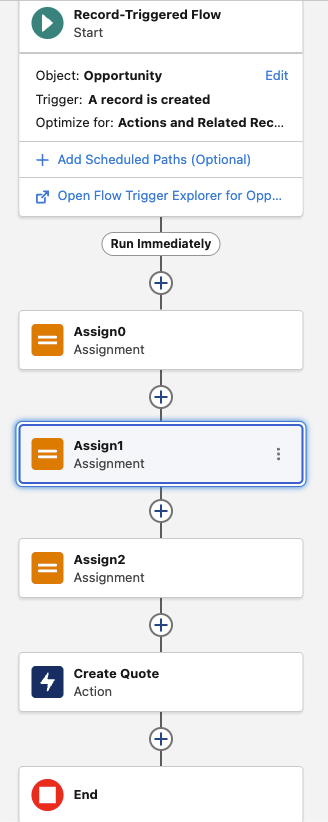
The Flow variables constructed are shown in the following table.
| Variable | Attributes | Apex Class | Collection | Value | Notes | |
| varQuoteField_Name | RevSalesTrxn__RecordMapWrapper | |||||
| .key | Name | Field Name | ||||
| .obj | MyQuote | |||||
| varQuoteField_Opportunity | RevSalesTrxn__RecordMapWrapper | |||||
| .key | OpportunityId | Field Name | ||||
| .obj | Triggering Opportunity ID | |||||
| varQuoteField_Pricebook | RevSalesTrxn__RecordMapWrapper | |||||
| .key | PriceBook2Id | Field Name | ||||
| .obj | ID | ID of price book record | ||||
| colQuoteFields | RevSalesTrxn__RecordMapWrapper | Yes | Add to collection for all of above QuoteField vars | |||
| varQuoteLineField_Quote | RevSalesTrxn__RecordMapWrapper | |||||
| .key | QuoteID | Field Name | ||||
| .obj | @{refQuote.Id} | ID of quote created | ||||
| varQuoteLineField_Product | RevSalesTrxn__RecordMapWrapper | |||||
| .key | Product2ID | Field Name | ||||
| .obj | ID | ID of Product on quote line | ||||
| varQuoteLineField_PriceBookEntry | RevSalesTrxn__RecordMapWrapper | |||||
| .key | PriceBookEntryID | Field Name | ||||
| .obj | ID | ID of price book entry record | ||||
| varQuoteLineField_Quantity | RevSalesTrxn__RecordMapWrapper | |||||
| .key | Quantity | Field Name | ||||
| .obj | 1 | |||||
| colQuoteLineFields | RevSalesTrxn__RecordMapWrapper | Yes | Add to collection for all of above QuoteLineField vars | |||
| varQuoteRef | RevSalesTrxn__RecordReference | |||||
| .record | ||||||
| .fieldvalues | colQuoteFields | equals collection of fields | ||||
| .type | Quote | |||||
| .method | POST | |||||
| referenceId | refQuote | label to reference within data structure | ||||
| varQuoteLineRef | RevSalesTrxn__RecordReference | |||||
| .record | ||||||
| .type | QuoteLineItem | |||||
| .referenceId | refQL1 | label to reference within data structure | ||||
| varGraph | RevSalesTrxn__Graph | |||||
| .records | varQuoteRef varQuoteLineRef | Add each of these | ||||
| .graphId | CreateQuote |
The varaiables are assigned values with Flow assignment statements such as shown below.
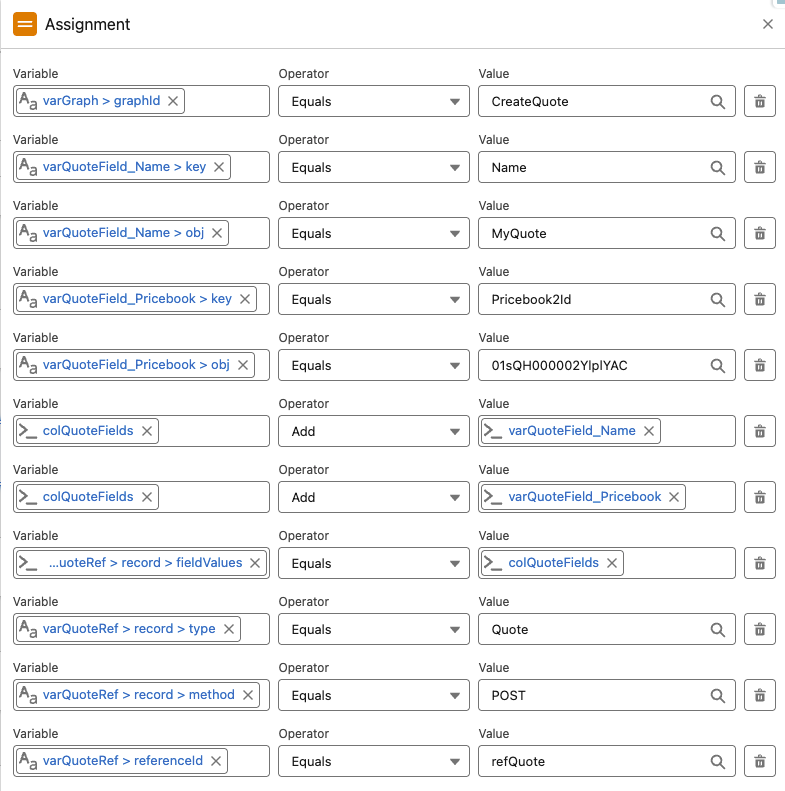
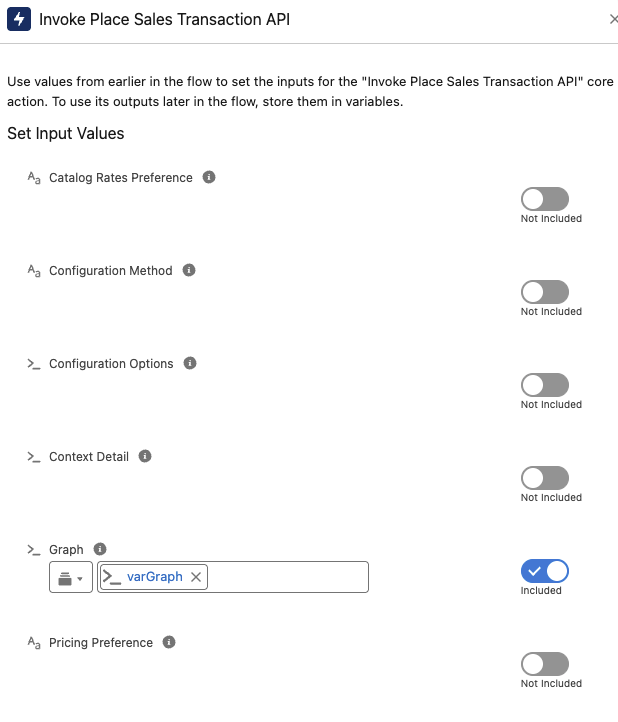
The API is then executed using an invocable action and passing the data structure contained within the varGraph Flow variable.
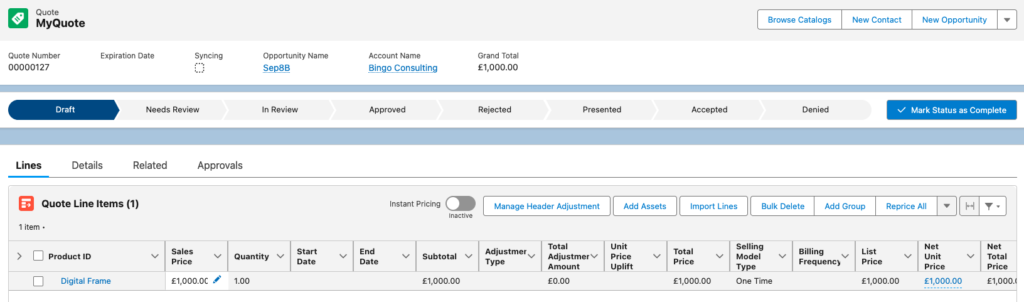
This then auto-creates the Quote record with the Quote Line Item setup for the chosen product following the creation of an opportunity.
This Flow approach with Invocable action can also be used to update a quote by adding additional quote lines for example or simply performing a quote price refresh.