The earlier post, Managing price, gaining profit with Salesforce Revenue Cloud, focussed on describing how the capabilities within Salesforce Revenue Cloud can support your pricing strategy.
This post builds on this theme by showing how Salesforce Revenue Cloud can be extended to support the presentation of product cost alongside your product pricing and so provide a profit metric and margin calculation for use in your sales process. It also demonstrates some further insights into configuring Revenue Cloud’s pricing procedure, the engine of its pricing mechanism.
As shown in my earlier post Salesforce Revenue Cloud pricing capabilities are wide and extensive. An architecture is supplied by the product which delivers flexible and scaleable quoting and pricing capabilities across the enterprise. However, when it comes to factoring cost into the sales quoting process there is currently a much reduced set of capabilities.
Having no cost information available when building our quotes means we are not in a position to provide details around profitability of the sales quote. This is a common scenario in Sales organisations. The question of costs and determination of profit often resides in the back office accounting where enterprise systems such as ERP or Accounting packages will be integrated with the Salesforce Order to invoice customers, update accounting ledgers, track revenue recognition and calculate gross profit margins on deals. Use of enterprise reporting packages such as Power BI or Tableau also figure in these areas.
However there are significant benefits in including a measure of cost and gross profit at the sales quote level:
- Profit margin can influence the approval process when discounting is introduced into the sales quote. We can avoid deals going under water where excessive discounting of highly profitable lines is taking place or normally profitable lines are given away to sell other products or services.
- Providing immediate feedback to the pipeline report on sales margins and which product lines are generating profit for the business can be particularly valuable when planning sales and marketing activities, giving the business the information required to focus activities on profitable deals.
- Involving the sales team in the profit picture and building an awareness of profit creates a culture which is not just about revenue, but focusses on sustainable success.
So where does Revenue Cloud stand in terms of working with costs? Currently we have available a Cost Book and Cost Book Entry data model as shown below. This is analogous to the standard Price Book and Price Book Entry model whereby we have a Cost Book Entry record for each product where we want to associate a cost. The Cost Book can be referenced by multiple Price Books, the thinking being that a Product may have a range of price points represented by Price Book Entries but a single Cost associated with the product.
As a data model this allows us to reference a cost against a product but there is no facility in the system to then reference that cost against a Quote Line and use that cost in any calculations around the quote such as margin calculation. To do that involves custom configuration and I describe below one way in which this can be built.
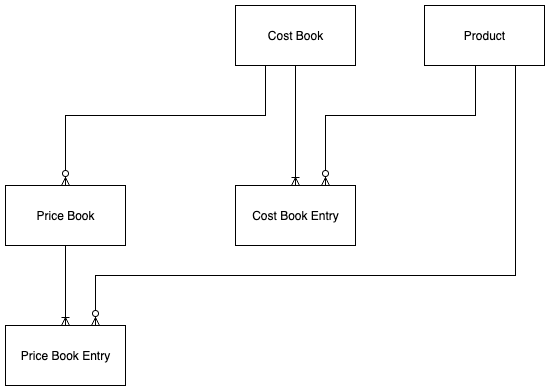
So we want to build on the above Cost Book model and extend the cost concept to the Quote and Quote Lines. We will also provide an additional cost mechanism such that if a Cost Book entry does not exist for a product we will define a percentage figure on the Product record for calculating a cost value. This gives us flexibility in terms of how costs can be setup and demonstrates how the standard Cost Book model can be supplemented and extended.
In configuring our new cost capability we first define some custom fields as shown in the table below.
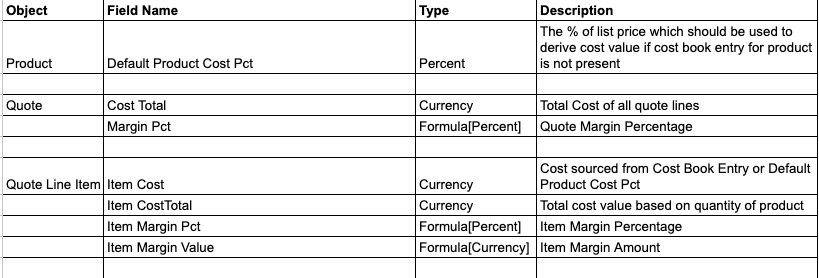
We are adding a custom field to the Product object to allow us to simply identify a percentage value against each product which can provide a cost figure if the Cost Book Entry for that product is not supplied.
We have some fields on the Quote Line item object which we will populate with the product cost from either the Cost Book Entry or the Product records as described above. And we also have some formulas which calculate the margin percentage and absolute value from the product List Price and Cost on the Quote Line.
Finally on the Quote record itself we want to sum the costs across the Quote Lines to get a total cost value. And also present a percentage figure based on total cost against total quote price to give us a gross profit margin for our quote.
To perform the above calculations at the quote and quote line level we want to make use of the Revenue Cloud Pricing Procedure. This is described in the earlier post, Salesforce Revenue Cloud pricing architecture
The Pricing Procedure is a variant of the Salesforce Business Rules Engine Expression Set technology and is designed to provide a system with decision making logic and calculated output capability. This is perfect for pricing calculations and using the Pricing Procedure technology will allow hundreds and eventually thousands of quote line calculations to support the quoting process. Any customisations and additional calculations around the Quote Line should therefore look to be incorporated within the Pricing Procedure to minimise potential issues involving calculation timing or associated system limits.
To incorporate our cost calculations into the Pricing Procedure we first require a Decision Table to be created. This Decision Table will contain our Product cost values and is setup by referencing the standard Cost Book Entry object which contains this information. Within the decision table we define our required logic which says return the cost from the Cost Book Entry record which matches our Product ID.
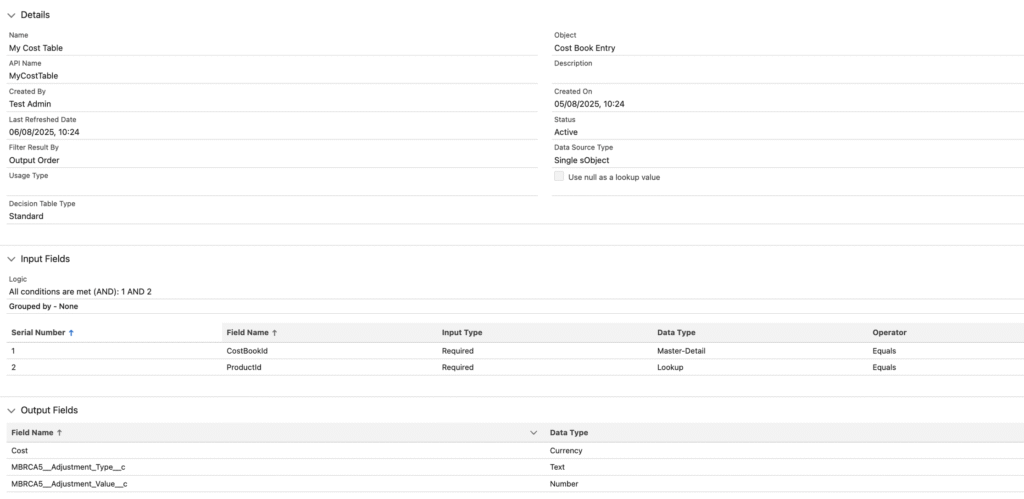
Once we have our Decision Table defined we can look to incorporate it within our Pricing Procedure elements. In order to do this we also have to define the data items which will be used for input and output of data between our data tables and our Pricing Procedure.
This requires us to update an additional system entity called the Context which defines a data model in terms of generic nodes and attributes with associated mappings to the data object fields where the data is sourced for each quote line update.
So the Context definition requires additional attributes, with associated tags used within the Pricing Procedure for the additional custom fields we have defined which source data ie product costs and output data ie total costs. A future article will cover in detail the Context definition and how to update it.
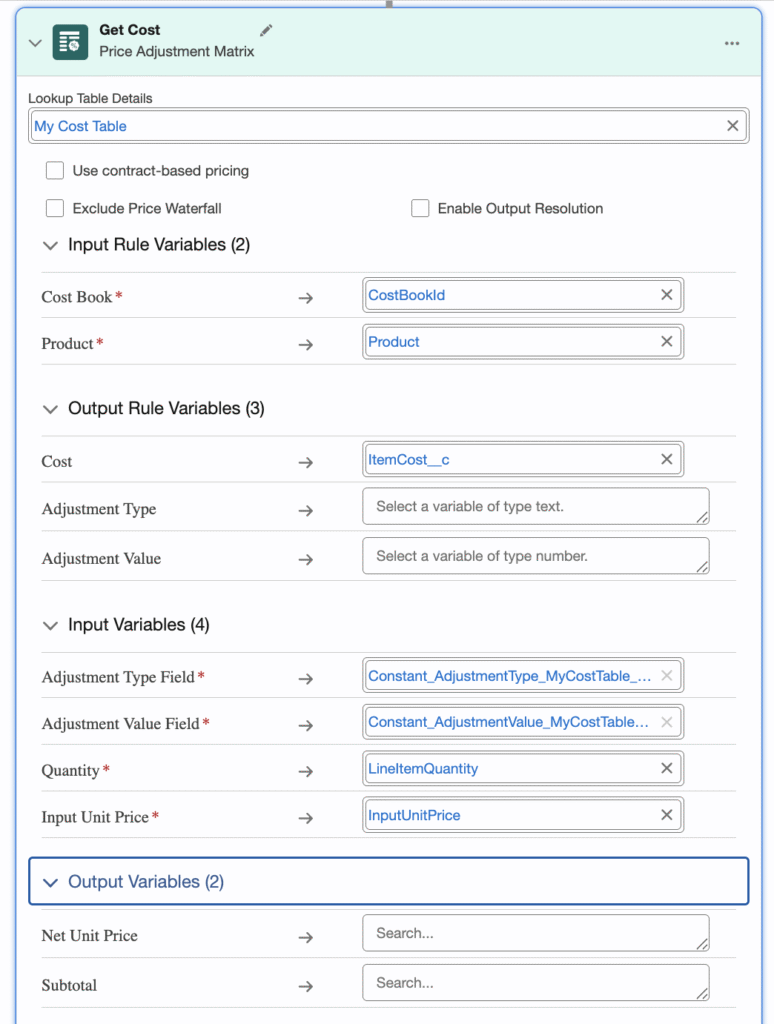
Now we have our Decision Table and updated Context we can modify our Pricing Procedure to access and use the Cost information. To do this we want to reference the above Decision Table we created. With Salesforce Expression Sets we would do this using a Lookup Table element within the Expression Set. The Revenue Cloud Pricing Procedure however does not currently support this Lookup Table element. Instead we only have available the Pricing Elements described in my previous article. However we can make use of the Price Adjustment Matrix element which uses a Decision Table reference to find the correct output data based on the Decision Table logic. Use of this is shown in the figure below. [to actually use this Price Element in this way we do have to add two additional custom fields to the Price Book Entries object – Adjustment_Type and Adjustment Value. The contents of these fields can be ignored in the solution we are building but they are required to support the Lookup Table call we want to make.]
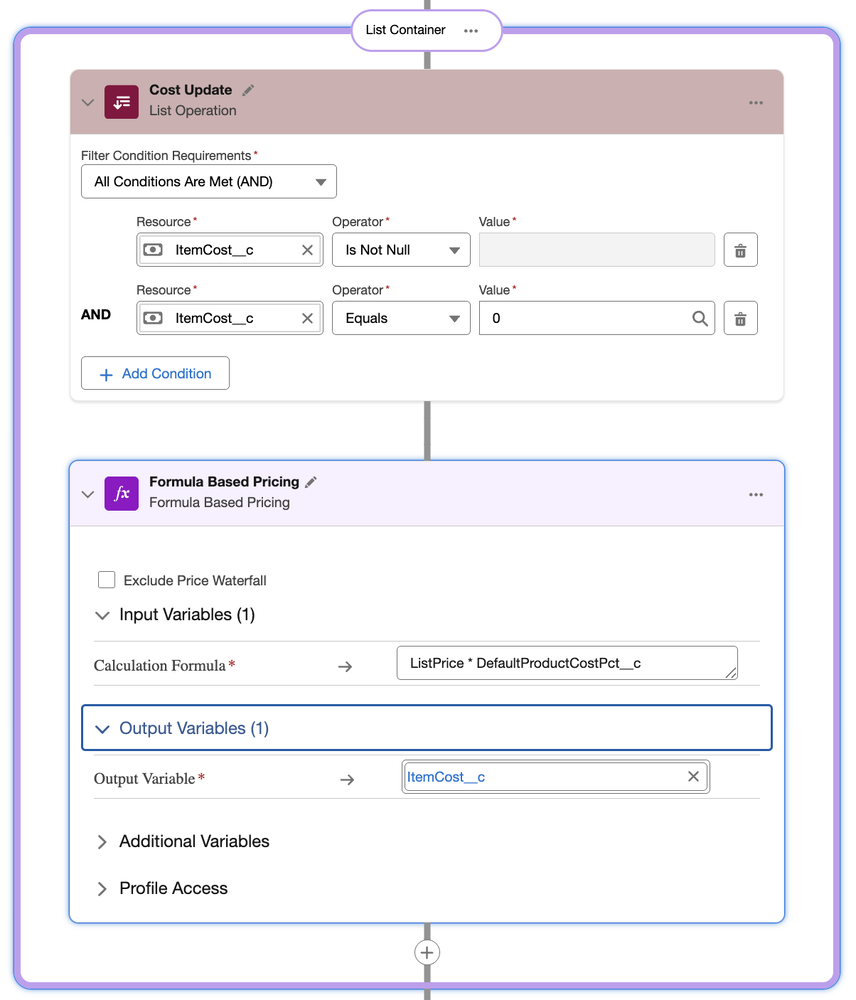
In addition to the above Pricing Element we also want to perform another operation which will source the Default Product Cost Percentage from the Product record if there is no Cost Book Entry for the Product. This demonstrates how the solution can flex and use data from different sources. To do this we use a List Container element which contains two additional Pricing Elements – A List operation which filters for where the Cost returned from previous element is either null or zero, followed immediately by a Formula element which will calculate the cost price from the product List Price and the Default Product Cost Percentage. This is shown in the figure below.
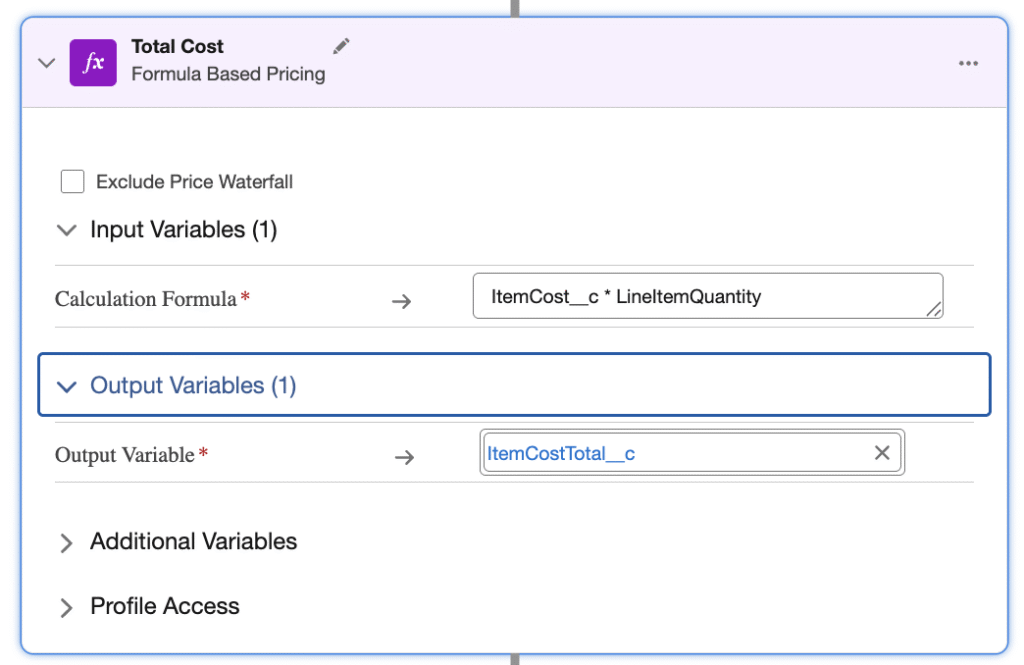
Finally, with our cost associated with our product we can calculate the total cost for the Quote Line Item by multiplying by the Line Quantity. For this we use another Formula element shown below.
Now we have our cost calculations within our pricing procedure our Quote Line Item cost fields which we added above are updated through the Context definition. We then can add these fields to our Transaction Line Editor to display as shown below.

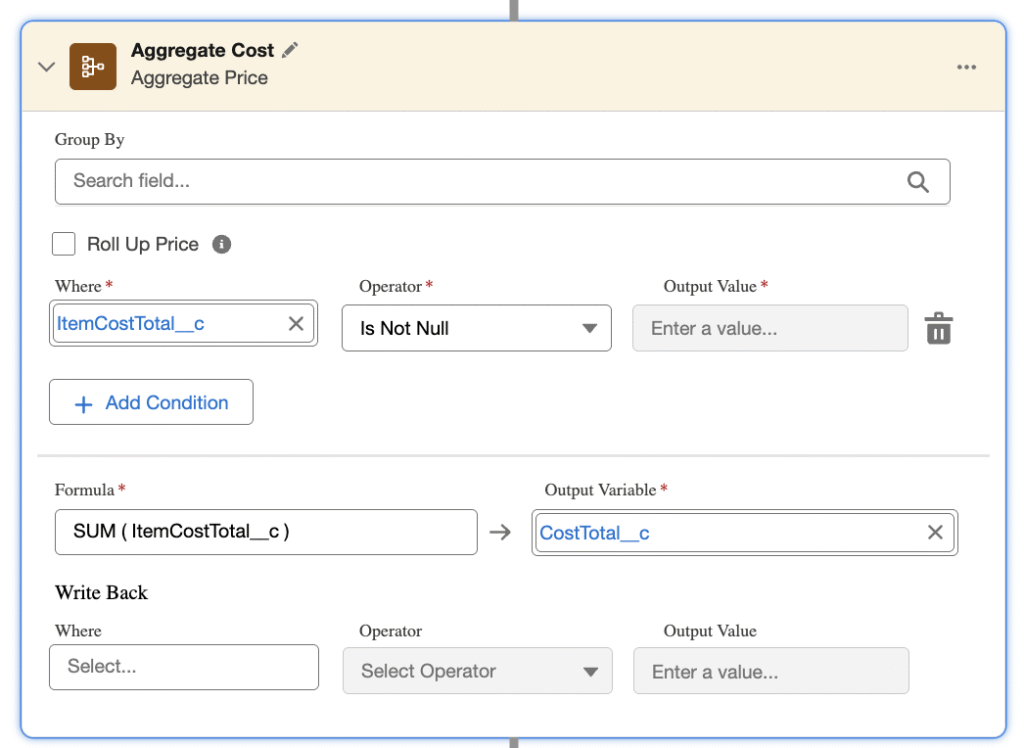
Finally we want to sum our Quote Line Item cost values up to the Quote header where we can calculate the total profit margin for the Quote. We do this with an Aggregate Price element within our Pricing Procedure. This is configured at the end of the Pricing Procedure to calculate the SUM of all the ItemCostTotal values and output to the CostTotal. This is then mapped to the Quote record via the Context definition.
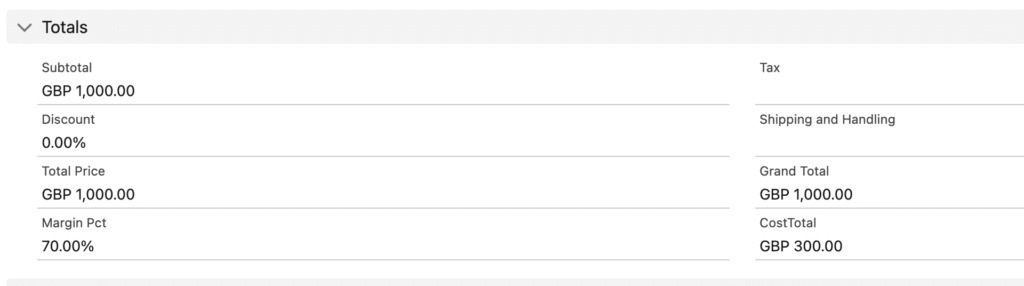
Now we can display our total cost and quote margin at the Quote record.
In this post we have shown how Salesforce Revenue Cloud can be extended to support the presentation of product cost alongside product pricing and so provide a profit metric and margin calculation for use in your sales process. It also demonstrates the detailed customisation of the Pricing Procedure and utilisation of the standard pricing elements to work with the additional data points around cost.